


Introduction
Reporting teams lose time when spreadsheet errors surface at the last minute. A wrong range, a copied formula, or a missing line item can change the message of the entire report and delay approval. That is why Claude to audit spreadsheets before reporting is useful for finance teams. It helps reviewers spot inconsistencies, question unusual values, and check whether the workbook logic matches the story the report is supposed to tell. This article explains how to use Claude for a cleaner pre-reporting review.
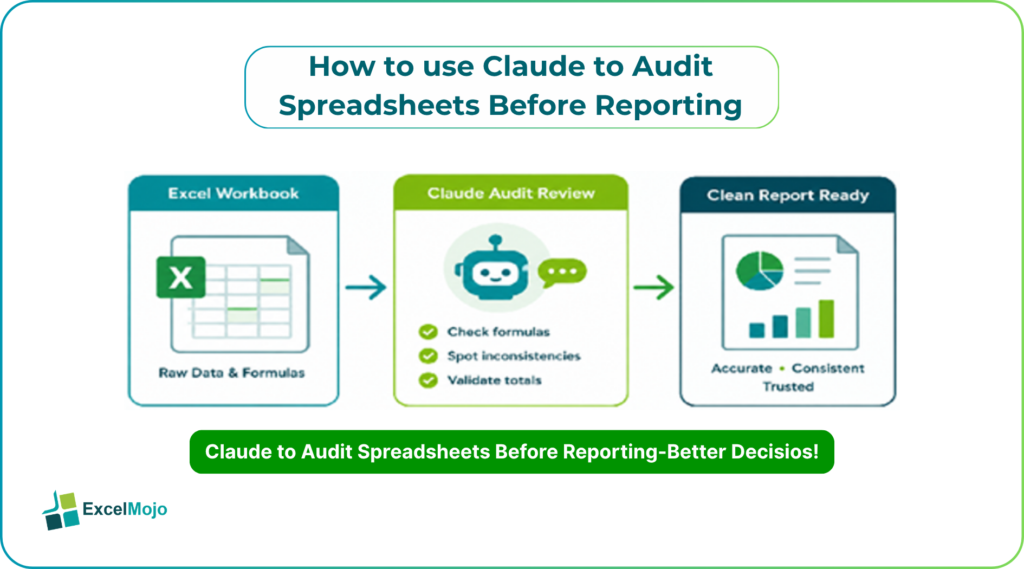
The real advantage when we use Claude to audit spreadsheets is not just speed. Claude can help create a structured review process around formulas, totals, and data consistency before a file reaches management, clients, or auditors. Microsoft’s Excel auditing tools such as Trace Precedents, Trace Dependents, and Evaluate Formula show that formula review is already a core Excel discipline, and Claude can sit alongside those checks as a faster first pass.
Why Spreadsheet Reviews Fail
Spreadsheet reviews often fail because teams focus on the output and ignore the path that created it. A total may look right at first glance, but the formula behind it may be broken, inconsistent, or pointing to the wrong range. Microsoft notes that inconsistent formulas and formula tracing are common reasons to use auditing tools in Excel.
Claude adds value because it can review patterns across a sheet and flag what does not fit. If one row uses a different formula than the rows above it, or if a report has blank cells where data should be present, Claude can help direct attention quickly. In practice, that means less time scrolling through formulas one by one and more time validating the high-risk areas.
A Clear Review Workflow
Claude to audit spreadsheets – A good review process starts with a specific task. Instead of asking Claude to “check the spreadsheet,” the user should define the purpose of the report, the key tabs, and the kinds of issues that matter most. That may include formula consistency, missing data, unusual shifts, or summary mismatches.
- Identify the reporting objective.
Say whether the file is for a monthly close, variance pack, forecast update, or client report. - Ask Claude to check formulas.
Focus on copied formulas, summary rows, and cells that should follow a clear pattern. - Review for missing or inconsistent data.
Look for blanks, duplicate labels, unexpected zeroes, or periods that do not match the rest of the file. - Scan for unusual movements.
Ask Claude to call out spikes or drops that need explanation before reporting. - Confirm in Excel.
Use formula auditing, control totals, and manual checks to validate the final sheet.
This workflow works because it combines AI review with standard Excel controls. The analyst still owns the numbers, but Claude helps narrow the search.
What Claude Should Check
Claude is most useful when the review scope is narrow and practical when we use Claude to audit spreadsheets.
- One of the highest-value checks is formula consistency. Microsoft specifically calls out inconsistent formulas as a common issue worth reviewing in Excel. If a formula pattern breaks in the middle of a row set, Claude can help identify the cell that needs a second look.
- Another useful check is data completeness. Missing cells, mislabeled items, and stray hardcoded values often create reporting problems that are easy to miss in a busy workbook.
- Claude can also help identify whether a result makes sense relative to the inputs. For example, if revenue rises but margin falls sharply, the outcome may be valid, but it should be explained before the report goes out.
Better Questions To Ask
Claude gives stronger results when the prompts are specific. A weak prompt often leads to broad commentary, while a strong prompt produces a practical review. Ask it to look for formula mismatches, blank rows, outlier values, and reconciliation issues rather than just summarizing the sheet.
A useful prompt might be: “Review this workbook for formula inconsistencies, missing values, and unusual changes before reporting.”
That gives Claude a real audit objective. If the workbook has source tabs and a summary tab, it can also be asked to compare the two and highlight any mismatches. That is especially helpful in finance packs where one broken reference can affect several downstream outputs.
Common Risks
The biggest risk when we use Claude to audit spreadsheets is treating Claude like a replacement for review discipline. It can highlight suspicious patterns, but it cannot fully validate a workbook unless the prompt gives enough context. Another risk is asking too broad a question, which can produce noisy output that is less useful than a targeted check.
There is also the danger of trusting a polished explanation without confirming the numbers. Claude may explain a variance clearly even if the sheet still contains a hidden formula error. That is why Excel auditing tools still matter. Microsoft’s Evaluate Formula feature lets users step through nested formulas one step at a time, which remains useful for final validation. Claude is best used as the first pass, not the final sign-off.
Finance Team Use Cases – Claude to audit spreadsheets
Claude is especially helpful in recurring finance workflows. In month-end financial reporting, it can help identify unusual expenses or margin movements before the pack is distributed. In budgeting, it can review whether assumptions were copied correctly across periods. In variance analysis, it can surface places where a number changed and needs an explanation rather than a repair.
It also helps when the report needs to be communicated to non-technical stakeholders. Claude can turn a dense workbook into a short review note that highlights exceptions, risk areas, and possible formula problems. That makes it easier for FP&A, accounting, and BI teams to move from spreadsheet cleanup to business explanation. The result is a tighter review loop and fewer late-stage corrections.
Spreadsheet Habits That Help
Teams get better results when they keep clean spreadsheet habits. One useful habit is separating input cells from formula cells. A clear structure makes it easier for Claude to tell whether an issue is in the source data or the calculation layer. Another habit is consistent labeling, since unclear headers and inconsistent naming often confuse both people and AI.
It also helps to maintain a control checklist for each report. That checklist should cover totals, row counts, missing items, and known exceptions. Claude can help draft or review that list, but the analyst should own the final control process. Over time, these habits reduce reporting risk and make each review faster than the last.
Conclusion
When we use Claude to audit spreadsheets it makes reporting faster and more organized. It helps teams catch inconsistent formulas, missing values, and unusual changes before those issues reach management or clients. That matters in finance and analytics, where speed is useful only if the numbers still hold up under review.
The best approach is simple. Use Claude to identify likely problem areas, then validate the workbook in Excel with standard auditing tools and control totals. Microsoft’s formula auditing features remain important, and Claude works best when paired with them. Together, they give teams a practical way to improve reporting quality without slowing delivery.
Frequently Asked Questions (FAQs)
Can Claude review spreadsheets before reporting?
Yes. Claude can help review formulas, spot inconsistent patterns, and flag unusual values before a report is finalized. It works best when the reporting goal and workbook structure are clearly defined.
What should Claude check first?
It should first check formula consistency, missing data, and any unusual changes in the output. These are often the highest-risk issues before reporting. It should also flag broken links, unexpected blanks, and cells that do not match the surrounding pattern. That gives the analyst a fast shortlist of places to review in Excel.
Is Claude enough to validate a report file?
No. Claude is useful for the first review, but Excel checks are still needed. Control totals, formula tracing, and manual validation remain essential. It can narrow the search and save time, but the final sign-off should still come from a person checking the workbook directly.
Where is Claude most useful in finance reporting?
It is most useful in month-end reporting, budgeting, variance analysis, and management pack preparation. Those workflows involve repeated formulas and time pressure, which makes AI-assisted review valuable.