


Introduction
Spreadsheet teams now expect AI to do more than draft text or answer prompts. They want faster formula help, cleaner analysis, and fewer hours lost to repetitive spreadsheet work. That is why Claude for Sheets vs ChatGPT for Sheets has become a practical buying decision for analysts, finance teams, and operations users. Claude and ChatGPT both aim to reduce manual work, but they do not solve the same problems in the same way. OpenAI’s spreadsheet direction now reaches both Excel and Google Sheets, while Claude’s spreadsheet strengths are still shaped more by file-based analysis and broader reasoning workflows.
For finance and data professionals, the real question is not which model sounds smarter. It is which one handles your actual workflow better, whether that means cleaning transaction tables, checking formulas, building rolling summaries, or explaining a variance table for management. In practical terms, the best choice often depends on context size, integration depth, and how much time the tool saves on repeatable spreadsheet tasks.
Best tool for Sheets
For Google Sheets specifically, ChatGPT currently has the clearer edge because its spreadsheet support is positioned across both Excel and Google Sheets, while Claude’s strengths are more visible in long-context analysis and multi-file reasoning. That means ChatGPT is usually the better fit when the work happens inside Sheets and the user wants a tighter tool-to-workflow connection. Claude is often stronger when the task starts with a messy workbook, a long prompt, or a broad analysis request that needs more context than a normal chat can hold.
The simplest way to choose is to match the tool to the job. Use ChatGPT when the team needs everyday spreadsheet assistance, quick formula support, or a lighter Google Sheets workflow. Use Claude when the assignment involves a larger analytical story, many linked tabs, or a deeper written explanation of what the data is doing.
How they Differ
Google Sheets users should think in terms of workflow friction, not branding. ChatGPT is better positioned as the broader spreadsheet assistant, while Claude behaves more like a strong reasoning engine that can help interpret and structure complex inputs. In practice, that means ChatGPT can feel more direct for in-sheet tasks, while Claude can be more useful when the answer depends on nuance, synthesis, or a larger evidence set.
The comparison becomes clearer in analyst work. Suppose a finance team is reviewing monthly revenue by channel and wants a formula to calculate month-over-month variance, plus a short explanation for the CEO. ChatGPT is likely the faster path for the formula draft and a quick iteration loop. Claude may produce a more polished narrative when the workbook is large, the logic is layered, and the explanation has to reflect several tabs at once.
Power BI Crossover
This comparison matters even outside spreadsheets because the same evaluation logic applies in Power BI. Power BI’s Key Influencers visual is built to identify major contributors to a selected result, while Copilot is positioned to help with summarization, writing, and report exploration across the Power BI experience. If a team already uses AI to understand drivers in Power BI, they should expect similar discipline in Sheets: start with a clear metric, define the explanatory fields, and validate the AI output with business logic.
That is especially important in driver analysis. A visual can rank contributors, but it does not replace judgment about causality, segment quality, or missing variables. Power BI visuals are designed to reveal patterns and relationships, and the Key Influencers visual is one of the AI-powered visuals for identifying major contributors. For analysts, the lesson is simple: AI should narrow the search, not close the case.
Practical Workflow
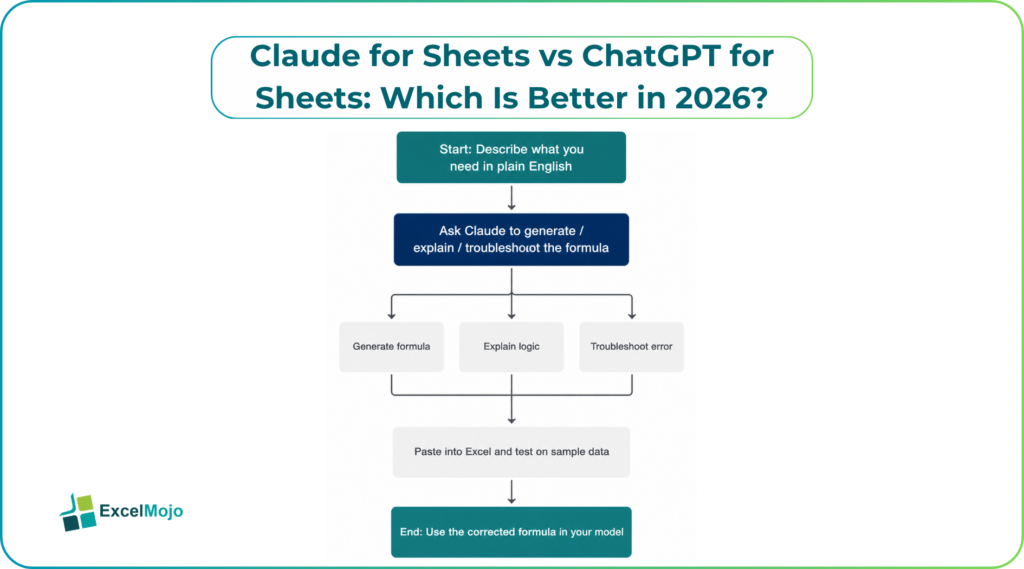
A reliable AI spreadsheet workflow follows a short sequence. First, define the question in plain English, such as “Why did margin fall in Q2?” Second, ask the AI to generate the formula, explanation, or summary. Third, test the output on a small sample of rows before applying it to the full sheet. Fourth, compare the AI’s answer with actual totals, because spreadsheet logic still depends on data quality, not just model quality.
In finance work, this matters even more. A model can look right and still be wrong if references shift, filters are ignored, or a text field is misread as numeric. That is why the best analysts use AI as a drafting layer, then verify against a control total, a pivot table, or a known reconciliation point. The result is faster work without losing auditability.
Common Mistakes
The biggest mistake is treating AI output as final output. Spreadsheet assistants can generate formulas, summarize trends, and suggest transformations, but they can also misread headers, assume the wrong range, or oversimplify a business rule. Another common error is asking a vague question like “analyze this sheet,” which usually produces generic commentary instead of decision-ready insights.
A second mistake is choosing the tool only by headline features. ChatGPT may be more practical for general spreadsheet coverage, while Claude may be stronger for long-context reasoning, but neither replaces good input structure, clean data, and a clear goal. The real productivity gain comes when the user gives the model a precise task, a defined range, and a target output format.
Feature Snapshot
| Area | ChatGPT for Sheets | Claude for Sheets |
|---|---|---|
| Google Sheets fit | Stronger current fit for spreadsheet workflows | Less Sheets-centric in current coverage |
| Long-context reasoning | Good | Stronger for large, complex inputs |
| Formula help | Fast and practical | Strong, especially for nuanced logic |
| Narrative analysis | Good | Often more polished for long explanations |
| Best use case | Daily Sheets tasks | Complex workbook interpretation |
Conclusion
For most Google Sheets users in 2026, ChatGPT is the better default choice because it is more directly aligned with spreadsheet workflows and broader sheet support. Claude still stands out for deep reasoning, longer context, and detailed analysis when the workbook gets messy or the explanation needs more synthesis. In finance, accounting, and BI teams, the smartest move is to use the model that matches the task instead of forcing one tool to do everything. For high-volume spreadsheet work, that usually means ChatGPT first, Claude second, and human review every time.
Frequently Asked Questions (FAQs)
Is ChatGPT better than Claude for Google Sheets?
For most Google Sheets workflows, yes, because ChatGPT has the stronger current fit for spreadsheet use and broader coverage. Claude can still be better for larger analytical contexts and more complex reasoning.
Is Claude better for financial analysis?
Claude can be stronger when the analysis spans many tabs, long instructions, or detailed narrative output. For quick spreadsheet tasks, ChatGPT is often easier to use.
Can AI replace Excel or Sheets formulas?
No. AI can draft formulas and explain logic, but the user still needs to validate ranges, references, and outputs with real data. That is especially true in finance and reporting work.
How does this relate to Power BI?
It relates directly because Power BI’s Key Influencers and Copilot are also designed to surface drivers and explain results, not replace judgment. The same validation mindset applies in both tools.