


What is TBILLEQ in Google Sheets?
The TBILLEQ function in Google Sheets is used to calculate the bond-equivalent yield for a Treasury bill. The calculation is based on its discount rate. Basically, it converts the T-bill’s discount yield (which assumes a 360-day year) into a bond-equivalent yield (based on a 365-day year). This provides a more accurate reflection of the T-bill’s return compared to other investments. For clarity, a treasury bill or T-bill is a short-term government security that is issued to raise funds. It is for a period ranging from a few days to one year. Instead of paying interest like other securities, T-bills are sold at a discount. One buys them for less than their face value or maturity value. When the T-bill matures, it gets the full face value. The difference is their profit.
The TBILLEQ function helps calculate the annualized yield, adjusting for a 365-day year to show what one’s return would be compared to other annual interest-paying investments. This helps in finding the profitability of your T-bill, relative to bonds or deposits.
Use this TBILLEQ in Google Sheets Template to follow along with the examples in this article.
Download Excel TemplateThe TBILLEQ function is especially useful for financial analysts and investors when they compare Treasury bills with bonds or other fixed-income securities that pay interest semi-annually. This function helps you quickly evaluate which investment offers a better return under comparable conditions.
For example, suppose a Treasury bill has a settlement date of 01-Jan-2024, a maturity date of 30-Jun-2024, and a discount rate of 6%. Using the formula
=TBILLEQ(DATE(2024,1,1), DATE(2024,6,30), 0.06)
the result would be 6.27% This shows the equivalent bond yield for the T-bill based on a 365-day year. In simpler words, this means that, if this same return were adjusted to a full-year basis like a regular bond’s interest rate, the T-bill would effectively be earning 6.18% annually, which is good for a low-risk investment.

Key Takeaways
- TBILLEQ in Google Sheets converts the discount yield of a Treasury bill into a bond-equivalent annual yield for easier comparison with interest-bearing securities.
- The syntax of the function is:
=TBILLEQ(settlement, maturity, discount)
- Each argument must be correctly formatted as a valid date or numeric value.
- TBILLEQ is best used when analyzing or comparing returns from different Treasury bills, bonds, or other fixed-income investments.
- The function is commonly applied in financial modeling, portfolio management, and investment decision-making to ensure accurate, annualized yield comparisons.
- It is a valuable tool for investors who want to quickly determine which short-term securities offer the best return potential based on consistent yield standards.
Syntax
The TBILLEQ function in Google Sheets formula is written as:
=TBILLEQ(settlement, maturity, discount)
Arguments:
- settlement: The date when the Treasury bill is purchased.
- maturity: The date when the Treasury bill matures.
- discount: The T-bill’s discount rate (expressed as a decimal).
Note:
- Both the settlement and the maturity dates must be valid dates.
- The maturity date must be later than the settlement date.
- The discount rate must be positive.
How To Use TBILLEQ Function in Google Sheets?
If you’re new to writing formulas in Google Sheets, here’s how to use TBILLEQ. The function is helpful when analyzing short-term government securities with long-term bonds to understand their relative yields.
You can enter the TBILLEQ function in two ways:
- Manually typing the formula,
- Selecting it from the Google Sheets function menu.
Let’s explore both methods step-by-step.
We have the details of a T-bill and must use them to find the bond-equivalent yield.
Step 1: Enter the T-bill details in a Google Sheet as shown below.

Step 2: Click on the cell where you want the result to appear. Here, its D2.
Type the following formula manually. The arguments are enclosed in parentheses and separated by commas, in the order specified in the syntax. The dates must be in the date format in the cells. Otherwise, use the DATE function and format them. For instance, DATE(2024,1,1). Here, since they are already in the DATE format, we use the cell references directly.
=TBILLEQ(A2, B2, C2)

Step 3: Press Enter. You will see the bond-equivalent yield appear in the cell.

Step 4: Drag the formula down to calculate yields for the other T-bills as well.
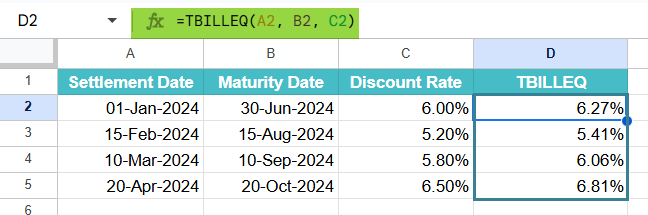
This will display a list of different yields corresponding to each T-bill’s discount rate and term.
Insert Through Google Menu Bar
- Go to Insert → Function → Financial → TBILLEQ.
- Select the Settlement, Maturity, and Discount Rate cells from your sheet.
- Press Enter to view the calculated bond-equivalent yield.
Thus, you can quickly evaluate which Treasury bill offers a higher equivalent return when compared to bonds or other investment options.
Examples
Usually, when one works with Treasury bills, they will compare yields to evaluate investment options. This helps them identify which T-bill offers the best return. TBILLEQ in Google Sheets simplifies these tasks by converting the discount yield of a T-bill into a bond-equivalent yield. Let us explore some practical examples that demonstrate how TBILLEQ works in different financial scenarios.
Example #1
In this example, we have an investor who purchases a Treasury bill and wants to determine its bond-equivalent yield to compare it with bond returns. Here, the T-bill is quoted at a discount. So, the investor uses the TBILLEQ function to find the equivalent annual yield based on a 365-day year. Let us see how to do this.
Step 1: Enter the details in a Google Sheet. This includes the settlement date, maturity date, and discount rate.

Step 2: Now, go to an empty cell and type the following formula:
=TBILLEQ(A2, B2, C2)

This function takes the settlement date, maturity date, and discount rate to compute the yield.
Step 3: Press Enter to view the bond-equivalent yield. Here, we get the annualized yield value. This shows the T-bill’s return which helps in the comparison with other annual interest-bearing investments.

With the help of TBILLEQ, the investor can understand the real annualized return. This helps them make informed decisions between short-term Treasury bills and longer-term bonds.
Example #2 – Comparing different Treasury bills to identify which offers the best yield
In this example, there is a financial analyst who wants to evaluate several Treasury bills with varying maturities and discount rates. He must determine which one offers the highest equivalent yield. This can help him identify the most profitable short-term investment option among multiple securities.
Step 1: Enter the data for all T-bills in the spreadsheet.

Step 2: In an empty cell, enter the TBILLEQ formula as follows:
=TBILLEQ(A2, B2, C2)

Step 3: Press Enter and drag the formula down to calculate the yields for all listed Treasury bills.
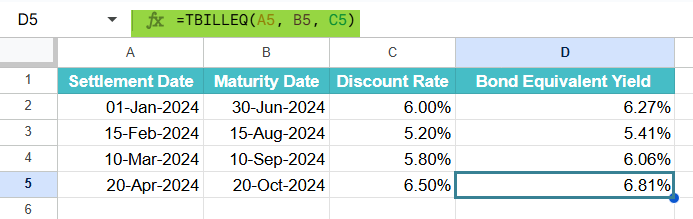
Step 4: Review the results to see which T-bill offers the highest bond-equivalent yield. The T-bill with the maximum TBILLEQ value represents the best potential return among the options.
Here, it’s the fourth T-bill.

Thus, the function helps the analyst can find investments that provide higher returns. This approach saves time and minimizes calculation errors compared to manual computations.
Example #3 – Using TBILLEQ with Conditional Formatting
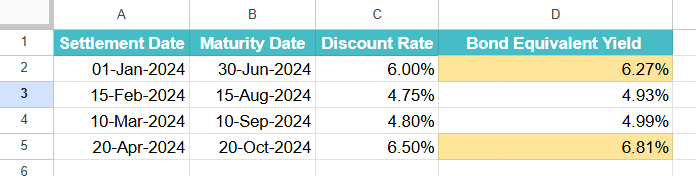
We have another example where a portfolio manager monitors multiple Treasury bills. She wants to visually highlight those yields that are above a certain threshold for quick decision-making. For this, she uses TBILLEQ in Google Sheets with Conditional Formatting to automatically color-code the results.
Step 1: Enter all the details such as settlement dates, maturity dates, and discount rates.
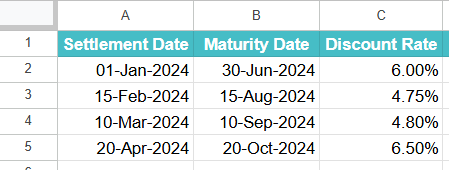
Step 2: Apply the TBILLEQ formula as follows:
=TBILLEQ(A2, B2, C2)

Step 3: Press Enter and drag the formula. Once the bond-equivalent yields appear, select the column containing the TBILLEQ results.
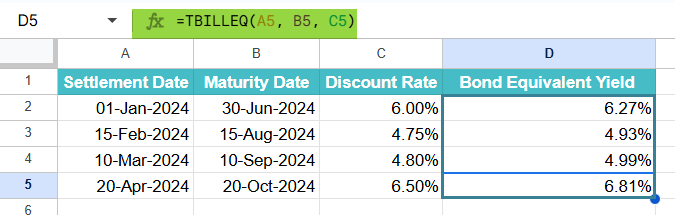
Step 4: Go to the menu bar and click Format → Conditional formatting. Under the formatting rules, choose “Greater than” and enter 0.05 to represent 5%. Select a fill color or cells meeting this condition and click Done.
The Treasury bills with yields greater than 5% will now be highlighted automatically.
We can combine TBILLEQ with Conditional Formatting to visually identify high-yield securities at a glance, simplifying comparison and improving portfolio management efficiency.
Important Things to Note
- If the settlement date is later than or equal to the maturity date, the TBILLEQ function in Google Sheets will return a #NUM! error.
- The discount rate entered in the function must be a positive decimal or percentage value; otherwise, it will result in a #VALUE! error.
- The TBILLEQ function assumes a 365-day year for calculations, unlike some other yield functions that may use 360 days.
- This function is useful for comparing Treasury bill yields with other fixed-income securities like bonds, as it expresses the yield on an equivalent annual basis.
- It is ideal for financial analysis, portfolio evaluation, and quick decision-making when comparing different short-term government securities.
Frequently Asked Questions (FAQs)
While the functions look similar at a glance, they serve different purposes.
First, both functions are used for Treasury bill analysis in Google Sheets. But,
TBILLEQ calculates the bond-equivalent yield, which annualizes the T-bill discount yield for comparison with bonds that pay annual interest.
TBILLYIELD, on the other hand, calculates the actual yield of a Treasury bill based on its discount rate and time to maturity, without converting it to a bond-equivalent yield.
Therefore, we can use TBILLEQ when we want an annualized comparison with interest-bearing instruments. We use TBILLYIELD when we need the T-bill’s straightforward yield.
TBILLEQ can be combined with other Google Sheets functions like IF, MAX, or FILTER in order to create more dynamic financial models.
In the below formula:
=IF(TBILLEQ(A2, B2, C2) > 0.06, “High Yield”, “Moderate Yield”), we check whether the bond-equivalent yield exceeds 6% and categorize the investment accordingly.
This kind of combination allows investors to filter, compare, and visualize yields efficiently within large datasets.
The TBILLEQ function is essential for investors who need to compare Treasury bill yields with bond yields on an equal basis. As T-bills are sold at a discount and don’t pay interest like bonds, their raw discount yield doesn’t provide a fair comparison. Therefore, by converting it to a bond-equivalent yield, TBILLEQ helps financial professionals and individual investors evaluate investment opportunities more accurately.
Use this TBILLEQ in Google Sheets Template to follow along with the examples in this article.
Download Excel TemplateRecommended Articles
Continue with these related resources when you want the next practical step in this topic.
- PV in Google Sheets
- FV in Google Sheets
- NPV in Google Sheets
- IRR Google Sheets Function
- PMT in Google Sheets
Explore the full Google Sheets Financial Functions guide or browse Google Sheets Resources.