


What is YIELDDISC in Google Sheets?
YIELDDISC in Google Sheets, is a financial function that calculates the annual yield of a discounted security. Here, it means a (non-interest-bearing security. The YIELDDISC function calculates the annual yield for zero-coupon securities, like Treasury bills, which don’t pay interest. It considers the settlement date, maturity date, price, and redemption value, along with an optional day count basis, to determine its prospective annual return.
It is used in financial analysis to understand the potential annual return of a security that pays no periodic interest but is sold at a discount. YIELDDISC is for discount securities. The annual yield of a security is calculated as follows:
Use this YIELDDISC in Google Sheets Template to follow along with the examples in this article.
Download Excel Template
Key Takeaways
- YIELDDISC in Google Sheets calculates the annual yield of a discounted (zero-coupon) security, bought below face value and redeemed at maturity.
- It is commonly used for Treasury bills, commercial papers, and other short-term discount bonds.
- The syntax of the YIELDDISC function is:
=YIELDDISC(settlement, maturity, price, redemption, [basis]) - Unlike YIELD (for coupon-paying bonds), YIELDDISC applies only to securities without periodic interest payments.
Syntax
The YIELDDISC Google Sheets formula is as follows:
=YIELDDISC(settlement, maturity, price, redemption, [day_count_convention])
- settlement – The settlement date of the security, the date after issuance when the security is delivered to the buyer.
- maturity – The maturity of the security, when it can be redeemed at face value.
- price – The price at which the security is bought.
- redemption – The redemption value of the security. The redemption value of a security is the amount you receive when the security matures.
- day_count_convention – [ OPTIONAL – 0 by default ] – An indicator of what day count method to use.
- 0 indicates US (NASD) 30/360 – This assumes 30 day months and 360 day years as per the National Association of Securities Dealers standard.
- 1 indicates Actual/Actual – This calculates based upon the actual number of days between the specified dates, and the actual number of days in the intervening years.
- 2 indicates Actual/360 – This calculates based on the actual number of days between the specified dates, but assumes a 360 day year.
- 3 indicates Actual/365 – This calculates based on the actual number of days between the specified dates, but assumes a 365 day year.
- 4 indicates European 30/360 – Similar to 0, this calculates based on a 30 day month and 360 day year, but adjusts end-of-month dates according to European financial conventions.
How To Use YIELDDISC Function in Google Sheets?
The YIELDDISC function in Google Sheets is used to calculate the annual yield of a discounted security, such as a Treasury bill, which does not pay interest but is issued at a discount and redeemed at face value.
It is useful in scenarios where investors want to evaluate the return on securities purchased below their redemption value.
To enter the YIELDDISC function in Google Sheets, there are two main ways:
- Enter YIELDDISC manually
- From the Google Sheets menu
Enter YIELDDISC Manually
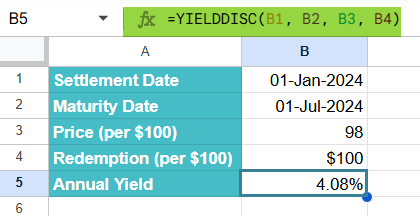
Let us look at the manual method to enter the YIELDDISC function. To illustrate this, we will calculate the annual yield of a discounted security with the following details:
- Settlement Date: 01-Jan-2024
- Maturity Date: 01-Jul-2024
- Price per $100 face value: $98
- Redemption value per $100 face value: $99
We will calculate the yield for this discounted security.
Step 1: Open Google Sheets and in a new spreadsheet, enter the required details.

Step 2: Enter the YIELDDISC formula in an empty cell B5. Here, we start with an = sign, followed by the function name and open braces. Enter the arguments in the order specified in the syntax, separated by a comma and close the braces.
=YIELDDISC(B1, B2, B3, B4)
- B1 – Settlement Date
- B2 – Maturity Date
- B3 – Price
- B4 – Redemption value

Step 3: Press Enter. The cell B6 will display the annual yield percentage for the discounted security.
The result, for example 0.0408 (or 4.08%), represents the annual yield earned from purchasing the discounted security and holding it until maturity.
Entering YIELDDISC Through the Menu Bar
- Go to the Insert tab. Choose Function → Financial.
- From the list, select YIELDDISC.
- Fill in all the arguments.
- Press Enter to get the result.
Examples
The primary purpose of YIELDDISC in Google Sheets is to calculate the annual yield of a discounted security, such as a Treasury bill, based on its purchase price and redemption value. Let us look at a simple example to do the same.
Example #1
Let us use the YIELDDISC function to calculate the yield of a Treasury bill. For instance, let’s say one has a Treasury bill with the following details:
- Settlement Date: 01-Jan-2020
- Maturity Date: 01-Jul-2020
- Price per $100 face value: $98
- Redemption value per $100 face value: $100
We want to calculate the annual yield using YIELDDISC.
Step 1: Set up the table with the following details in an empty spreadsheet.

Step 2: Let us enter the following formula.
=YIELDDISC(B1, B2, B3, B4)

Step 3: Press Enter. We got the result as 0.0619 (or 6.19%).
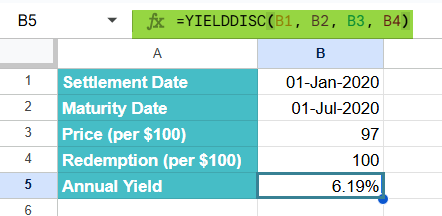
The Treasury bill yields 6.08% annually when purchased at $97 and redeemed at $100 after 6 months.
Example #2 – Determine the annual yield on a discount bond
Let us use the YIELDDISC function to determine the annual yield on a short-term discount bond. For example, a Treasury bill bought below face value. For instance, a man buys a 6-month T-bill on 01-Mar-2022 for $98.25 per $100 face value; it redeems at $100 on 01-Sep-2022. We want the annual yield expressed as a percentage.
Step 1: Set up your dataset with the following details in an empty Google Sheets spreadsheet.
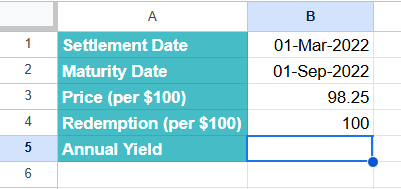
Step 2: Let us enter the following formula in cell B5 (we’ll use the Actual/360 money-market convention by adding 2 as the optional basis — common for short-term discount securities):
=YIELDDISC(B1, B2, B3, B4, 2)
Here:
- B1 → Settlement Date
- B2 → Maturity Date
- B3 → Price (per $100)
- B4 → Redemption (per $100)
- 2 → basis = Actual/360 (optional; omit to use default basis = 0 — US 30/360).

Step 3: Press Enter. The cell B5 will display the annual yield. With the numbers above the result is ≈ 0.03485, i.e. 3.485% (format the cell as Percentage to show 3.48%).
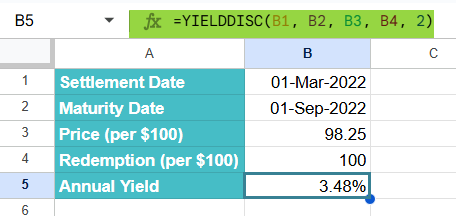
The YIELDDISC function annualizes the small gain (redemption − price) over the short holding period using the chosen day-count basis, giving the comparable yearly yield.
This tells you that buying the T-bill at $98.25 and holding to maturity gives an annualized return of ≈3.49% (Actual/360 basis). It can also be found for a different convention by changing the basis argument.
Example #3 – Calculate the yield of a non-interest-bearing security
To calculate the yield of a non-interest-bearing security, we use the YIELDDISC formula. For example, a 90-day T-bill was issued on Jan 1, 2025, settled on Jan 3, 2025, matures on April 1, 2025, was bought at a price of 99.00 and has a redemption value of 100. Let us calculate the annualized yield of this non-interest-bearing security based on its purchase price.
Step 1: Enter all the details in a Google Sheet.

Step 2: Enter the formula for YIELDDISC as shown below. We can see the formula in the screenshot.
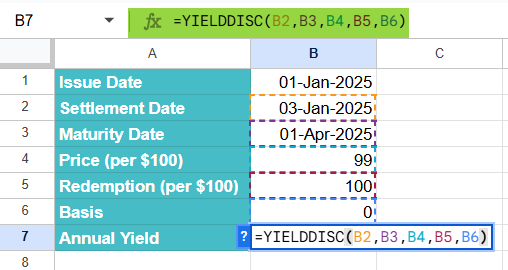
Step 3: Press Enter. We get the annual yield of discounted (zero-coupon) security.

Simple, isn’t it? YIELDDISC helps investors determine the effective annual return on short-term discount bonds like Treasury bills. One can also compare the yield of discounted securities with other investments to make informed decisions.
Important Things to Note
- The settlement and maturity dates should be entered either with the DATE, TO_DATE or other date parsing functions, and not as text.
- It is very helpful in determining the annual yield on a discount bond. And to calculate the yield of a non-interest-bearing security.
- In this formula, the settlement date is the date a buyer purchases a coupon. The maturity date is the date when a coupon expires. As an example, there is a 10-year bond is issued on January 1, 2020, and is purchased by a buyer six months later. Here, the issue date is January 1, 2020, the settlement date is July 1, 2020, and the maturity date would be January 1, 2030, 10 years after the issue date.
Frequently Asked Questions (FAQs)
The YIELDDISC function calculates the return (yield) on a security that is sold at a discount and redeemed at full value, such as Treasury bills. These types of security don’t pay interest. However, you can buy them cheaper and get the full amount at maturity. The difference is what you earn and with YIELDDISC, it can be converted into an annual percentage yield.
A function like YIELD is used for bonds or securities that pay periodic interest (coupons), but YIELDDISC is specifically for discounted securities with no interest payments.
Some of the errors we get include: #NUM! Error – We get this if the settlement ≥ maturity, or if the
1. price ≤ 0
2. redemption ≤ 0
3. price ≥ redemption.
#VALUE! Error – We get this when the dates are typed as plain text or non-numeric values are used for price/redemption.
Decimal Instead of Percentage – By default, YIELDDISC returns a decimal (e.g., 0.0108). Change cell format to percentage to display as 1.08%.
Some similar functions include:
1. YIELD: It calculates the annual yield of a security paying periodic interest like a US Treasury Bond.
2. TBILLYIELD: This function calculates the yield of a US Treasury Bill based on price.
3. PRICEDISC: It calculates the price of a non-interest-bearing security, based on expected yield.
4. PRICEMAT: Calculates the price of a security paying interest at maturity. It is based on the expected yield.
Use this YIELDDISC in Google Sheets Template to follow along with the examples in this article.
Download Excel TemplateRecommended Articles
Continue with these related resources when you want the next practical step in this topic.
- PV in Google Sheets
- FV in Google Sheets
- NPV in Google Sheets
- IRR Google Sheets Function
- PMT in Google Sheets
Explore the full Google Sheets Financial Functions guide or browse Google Sheets Resources.