


What is TBILLPRICE in Google Sheets?
TBILLPRICE in Google Sheets is a function used to calculate the price per $100 face value of a Treasury bill (T-bill) based on its discount rate. The function returns the price value according to the provided settlement date, maturity date, and discount rate.
The TBILLPRICE function helps determine how much an investor would pay today for a Treasury bill that will mature at a specific date in the future. It is particularly useful in financial analysis, investment tracking, and calculating short-term government securities pricing.
Use this TBILLPRICE in Google Sheets Template to follow along with the examples in this article.
Download Excel TemplateAs an example, let us enter the following parameters within the formula. This formula calculates the price per $100 face value of a U.S. Treasury bill (T-bill) that matures on June 30, 2025, when purchased on January 1, 2025, at a discount rate of 4.5%. The function returns the price per $100 face value of the T-bill.
=TBILLPRICE(DATE(2025,1,1), DATE(2025,6,30), 0.045)
The result is approximately 97.75, meaning the investor would pay $97.79 now for each $100 received at maturity.

Key Takeaways
- TBILLPRICE in Google Sheets calculates the price per $100 face value of a Treasury bill using settlement date, maturity date, and discount rate.
The syntax is:
=TBILLPRICE(settlement, maturity, discount)
- TBILLPRICE can be combined with financial or array functions like AVERAGE, ARRAYFORMULA, and TBILLYIELD for broader portfolio analysis.
- It assumes a 360-day year and only applies to Treasury bills maturing within one year of purchase.
- The function helps investors determine the fair purchase price of a T-bill and analyze how changes in discount rates affect its value.
Syntax
The TBILLPRICE in Google Sheets formula is as follows:
=TBILLPRICE(settlement, maturity, discount)
Arguments:
- settlement: The Treasury bill’s settlement date — the date after the issue date when the T-bill is purchased.
- maturity: The T-bill’s maturity date — the date when the T-bill expires and the principal is repaid.
- discount: The T-bill’s discount rate expressed as a decimal (for example, 4.5% entered as 0.045).
Here, the settlement and maturity dates must be valid dates entered using the DATE function or as date references. The maturity date must be within one year (or 365 days) of the settlement date, since T-bills are short-term instruments.
How to Use TBILLPRICE Function in Google Sheets?
The TBILLPRICE function in Google Sheets is used to calculate the price per $100 face value of a Treasury bill based on its discount rate. It returns the purchase price (less than $100) if the T-bill is sold at a discount.
It is useful in financial modeling, government bond valuation, and portfolio management where short-term investment returns need to be analyzed.
There are two main ways to enter the TBILLPRICE function in Google Sheets:
• Enter TBILLPRICE manually
• From the Google Sheets menu
Enter TBILLPRICE Manually
Let us look at the manual method to enter the TBILLPRICE function. To illustrate this, we will calculate the price of a Treasury bill.
Step 1: Open Google Sheets and in a new sheet, enter the following data:

Step 2: Click in cell D2 and enter the formula:
=TBILLPRICE(A2, B2, C2)

Step 3: Press Enter. The result will show the T-bill’s price per $100 face value.
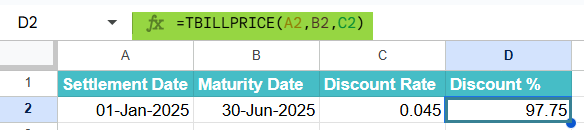
Step 4: Drag the formula down to calculate prices for other rows.
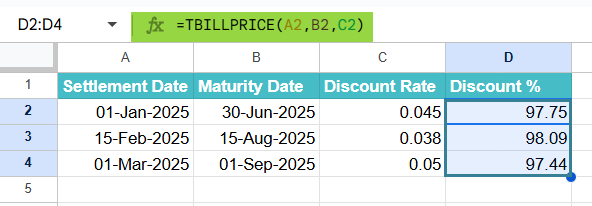
The TBILLPRICE function calculates the purchase price of Treasury bills based on their discount rates and time to maturity. It assumes a 360-day year in its computation.
Please note that the function only provides the theoretical price. It does not include brokerage fees, taxes, or other costs.
Entering TBILLPRICE Through the Menu Bar
- Go to the Insert tab. Choose Function → Financial.
- From the list, select TBILLPRICE.
- Enter the required arguments and press Enter.
Examples
The TBILLPRICE function helps investors and analysts calculate how much they need to pay for a T-=bill today based on its discount rate and maturity date. It’s a useful tool for evaluating short-term government investments and comparing different market scenarios.
Below are several real-life examples that show how to apply this function in practical situations.
Example #1 – Calculate the price of a US Treasury Bill for investment purposes
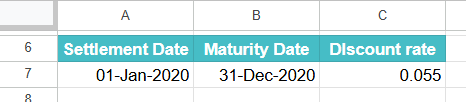
An investor plans to buy a 6-month U.S. Treasury Bill with a discount rate of 5.5%. They want to find the current purchase price per $100 face value to understand how much the investment will cost today. This helps determine the return they’ll receive at maturity.
Step 1: In a new Google Sheet, enter the following data as shown below.
Step 2: Click in cell D2 and type the formula below:
=TBILLPRICE(A2, B2, C2)
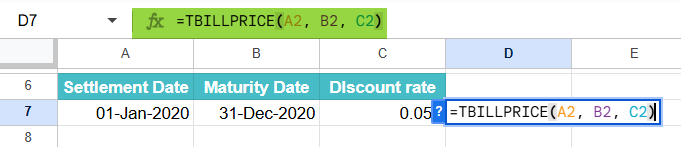
Step 3: Press Enter. The cell will display the calculated purchase price for the Treasury bill.
The investor would pay $97.79 for every $100 face value of the Treasury bill. This means they will earn $2.21 upon maturity, representing their return on investment. The TBILLPRICE function thus helps estimate fair pricing before purchasing short-term securities.

Example #2
A financial analyst wants to compare two Treasury bills with the same 4.5% discount rate but different maturities — one for 3 months and another for 9 months. This comparison will show how the length of time until maturity affects the bill’s price.
Step 1: Enter the following data into your spreadsheet:

Step 2: In cell D2, type the formula and drag it down to D3:
=TBILLPRICE(A2, B2, C2)

Step 3: Press Enter. The function calculates the price for each T-bill automatically.
Even though both bills have the same discount rate, the longer-term T-bill has a lower price because investors must wait longer to get their returns. This demonstrates how time to maturity directly influences bond pricing and investor preference for liquidity.
Example #3 – Assess the value of US Treasury Bills in different market conditions
A portfolio manager wants to understand how changes in market interest rates affect the price of Treasury bills. By testing different discount rates for the same maturity period, they can evaluate how sensitive T-bill prices are to market fluctuations.
Step 1: Enter the following information in your sheet:

Step 2: Type this formula in cell D2.
=TBILLPRICE(A2, B2, C2)

Step 3: Press Enter. With this formula, you can get the price for each discount rate. Based on this you can assess its performance for different market conditions.

As discount rates increase, T-bill prices decrease, showing the inverse relationship between interest rates and bond prices. This helps investors decide whether to buy or wait, based on interest rate trends in the economy.
Important Things to Note
- The settlement date must be earlier than the maturity date, and both must be valid date values in Google Sheets.
- The difference between the settlement and maturity dates cannot exceed one year, as T-bills are short-term securities.
- The discount rate must be expressed as a decimal (for example, 4.5% should be entered as 0.045).
- The result of TBILLPRICE represents only the theoretical purchase price — it does not account for brokerage fees, taxes, or transaction costs.
- If any date is invalid or the settlement date is later than the maturity date, Google Sheets will return a #NUM! or #VALUE! error.
- The function is especially useful for investment analysis, allowing investors to compare prices and yields across different maturities and discount rates.
Frequently Asked Questions (FAQs)
TBILLPRICE calculates the price per $100 face value of a U.S. Treasury Bill based on its settlement date, maturity date, and discount rate. It helps investors understand how much they’ll pay today for a T-bill that pays $100 at maturity.
Treasury bills in the U.S. use a 360-day year convention for standardization and simplicity in financial calculations. This assumption slightly affects price calculations compared to a 365-day year.
If the maturity date exceeds one year from the settlement date, Google Sheets will return a #NUM! error, since Treasury bills are short-term instruments with maturities under one year.
TBILLPRICE is designed specifically for U.S. Treasury bills and may not accurately represent securities from other markets that use different calculation conventions.
You can combine TBILLPRICE with other functions like AVERAGE, IF, or ARRAYFORMULA to analyze multiple T-bills at once.
For example: =ARRAYFORMULA(TBILLPRICE(A2:A10, B2:B10, C2:C10))
This formula calculates T-bill prices across multiple rows automatically.
Use this TBILLPRICE in Google Sheets Template to follow along with the examples in this article.
Download Excel TemplateRecommended Articles
Continue with these related resources when you want the next practical step in this topic.
- PV in Google Sheets
- FV in Google Sheets
- NPV in Google Sheets
- IRR Google Sheets Function
- PMT in Google Sheets
Explore the full Google Sheets Financial Functions guide or browse Google Sheets Resources.