


Introduction
Business teams often struggle with a simple trade-off in Power BI. Either import the whole dataset and get fast, responsive visuals, or connect directly to the source and keep the data fresh at the cost of slower performance. Power BI Composite Models AI hybrid data pattern addresses this by letting analysts mix imported tables with DirectQuery tables in the same semantic model. This where the data lives rather than forcing a single mode for everything. When combined with AI‑driven design suggestions, this hybrid approach can help data teams decide which tables should be imported, which should stay in DirectQuery, and how to layer aggregations to keep reports snappy.
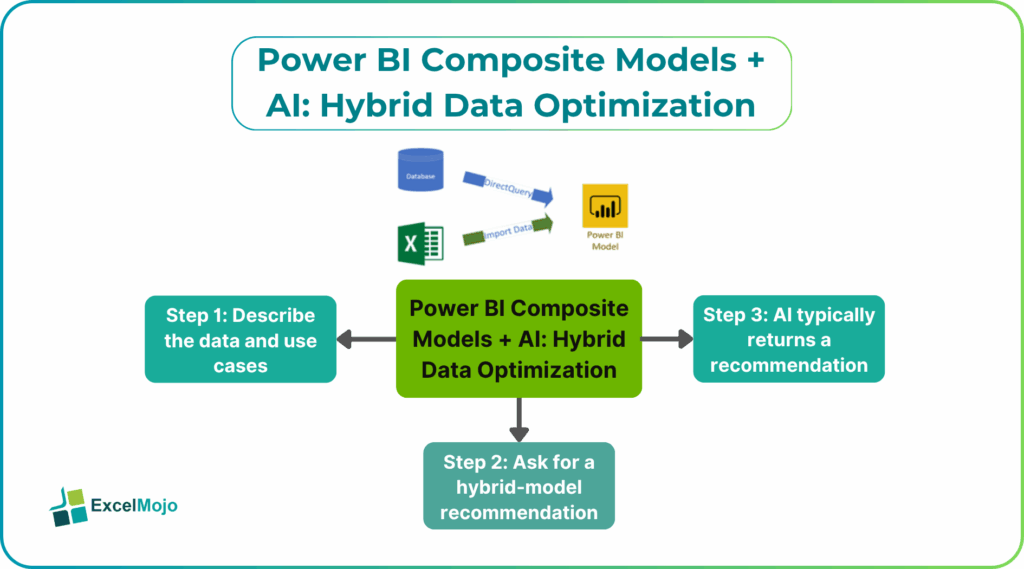
This article explains how to design AI hybrid data modeling in Power BI using Power BI Composite Models with AI optimization. You also learn how to structure such a model, and how to avoid common performance traps. Composite models support multiple data connections, including mixtures of import and DirectQuery. The strategic use of storage modes can improve performance while keeping latency low. For Power BI users, that means Copilot and similar tools can help suggest storage patterns and optimizations without needing deep infrastructure expertise.
What a Composite Model is (and why Hybrid Helps)
A composite model in Power BI Desktop is a dataset that draws from more than one connection group, typically combining imported tables and DirectQuery tables. The most common use is to import static, small‑to‑medium dimensions (such as customers, products, or calendars) while keeping large fact tables or real‑time operational data in DirectQuery.
- Imported tables bring data into the Power BI cache, so DAX queries execute very quickly.
- DirectQuery tables always query the source (often a database or Fabric warehouse), so the data is current but queries can be slower.
By combining the two, teams gain both speed and freshness. This is the core idea behind these Power BI Composite Models and why it matters for reports that must balance performance with real‑time needs.
How to Design a Hybrid Data Layout
Designing a Power BI Composite Models AI hybrid data setup effectively starts with understanding which tables matter most for performance and which must stay real‑time.
Typical patterns include:
- Import: Dimension tables (Customer, Product, Date), lookup tables, and slowly‑changing metadata.
- DirectQuery: Large fact tables (Sales, Orders, Logs) and tables that change frequently and need low latency.
Microsoft’s composite‑model guidance recommends segmenting tables by access pattern and then choosing storage modes that match those patterns. For example, queries that run constantly on Customer or Product should run against imported dimensions, while the heavy numeric aggregates come from DirectQuery fact tables.
How AI can Help Shape the Model
AI hybrid data modeling in Power BI works best when the user describes the data landscape and the performance goals and lets AI suggest a storage‑mode layout.
Step 1: Describe the Data and use Cases
Before asking the AI tool, write a short description such as:
- “I have a sales model with a large fact table of daily transactions, a small Customer table, a Product table, and a calendar. Users care about performance for customer‑level and product‑level views, and the data must be fresh within 15 minutes.”
- “I want to build a hybrid model that uses both import and DirectQuery to keep the report fast but still reflect recent changes.”
These statements give the AI tool the context it needs.
Step 2: Ask for a Hybrid‑Model Recommendation
A strong prompt for Power BI Composite Models AI data optimization is as follows:
“In Power BI, I have these tables:
- FactSales (large fact table with daily transactions).
- DimCustomer (small table with customer details).
- DimProduct (small table with product details).
- DimDate (calendar table).
I want to design a composite model that balances performance and data freshness.
Which tables should I import and which should stay in DirectQuery?
Also, suggest where user‑defined aggregations might help and where to keep relationships simple.”
AI typically returns a recommendation such as:
- Import DimCustomer, DimProduct, and DimDate.
- Keep FactSales in DirectQuery and consider aggregations for common roll‑ups.
- Keep the relationships as one‑to‑many between the imported dimensions and the DirectQuery fact table.
This is the core of Power BI Composite Models with AI optimization and shows how AI can compress a complex, pattern‑based decision into a clear, structured layout.
Practical Example: A Sales and Log Dashboard
A common use case is a combined dashboard that shows both sales performance and system or user‑level logs. Using Power BI Composite Models AI hybrid data, the pattern becomes:
- Keep the FactSales table in DirectQuery, since it is large and users expect fresh data.
- Import DimCustomer and DimProduct because lookups on those tables are frequent and speed‑sensitive.
- Ask AI for a suggestion on aggregations, such as summarized daily or monthly sales by customer, and use those for the most common queries.
- Test the report behavior under different filters and data volumes to verify that the model feels responsive.
This workflow is a practical example of hybrid data optimization Power BI Composite Models and shows how AI‑driven suggestions can speed up the design of a mixed‑mode semantic model.
Pitfalls and Best Practices
Power BI Composite Models AI hybrid data can improve performance but also introduces a few common issues.
One common problem is overusing DirectQuery on dimensions. If lookup tables such as Customer or Product are kept in DirectQuery, even simple filters can trigger expensive round‑trips to the source. Best practice is to favor importing small, frequently‑used dimensions and reserving DirectQuery for large numeric fact tables.
Another risk is complex relationships across modes. Many‑to‑many relationships between imported and DirectQuery tables can generate inefficient queries and slow down the model. Teams should prefer one‑to‑many relationships and keep cross‑storage joins minimal.
A third pitfall is ignoring aggregations. Without aggregations, every query on a large DirectQuery fact table hits the full dataset. Pre‑aggregating common roll‑ups (for example, sales by day and by customer) can reduce query volume significantly and is a key part of Power BI Composite Models AI data optimization.
Frequently Asked Questions (FAQs)
Power BI Composite Models AI hybrid data can replace many fully imported models, but the choice depends on the business requirements. If low latency and real‑time data are important, a hybrid approach is often better. If the dataset is not too large and ingestion pipelines are reliable, a fully imported model may be simpler to manage.
Power BI Composite Models with AI optimization and a pure DirectQuery setup both connect directly to the source, but the composite model adds imported dimensions and optional aggregations. This hybrid approach usually provides better performance for common user queries while still keeping the data fresh.
AI hybrid data modeling in Power BI suggestions can be useful starting points, but they should always be validated against the organization’s performance, security, and latency requirements. Teams should test the model with real workloads and review the storage‑mode layout before publishing to all users.
Yes, hybrid data optimization Power BI Composite Models can work with multiple data sources, such as a SQL database for fact data, a Fabric warehouse for aggregated tables, and imported Excel or CSV files for reference data. The composite model lets the modeler combine these sources while still choosing storage modes that match each table’s role.
Recommended Articles
Continue with these related resources when you want the next practical step in this topic.
- Power BI Dax
- Measures in Power BI
- Power BI Calculate
- Row Context and Filter Context in DAX
- Power BI Calculated Table
Explore the full Power BI Data Modeling and DAX guide or browse Power BI Resources.