


What Is COUPPCD Function in Google Sheets?
The COUPPCD function in Google Sheets helps financial experts determine the last coupon payment date before the settlement of a bond. Generally, bonds with periodic interest follow a fixed schedule. Therefore, knowing the date of the previous payment is essential when calculating accrued interest or to check past cash flows.
To see a simple example, a person buys a bond on March 10, 2023, and it matures on March 31, 2025. The bond pays interest once in six months. Let us use the following formula to get the previous coupon date.
=COUPPCD(DATE(2023,3,10), DATE(2025,3,31), 2, 0)
This function is useful to find how much time has passed since the last interest payment.

Use this COUPPCD in Google Sheets Template to follow along with the examples in this article.
Download Excel TemplateKey Takeaways
- COUPPCD in Google Sheets returns the previous coupon payment date before a bond’s settlement date.
- The syntax of the function is as follows: =COUPPCD(settlement, maturity, frequency, [basis]). This is similar to COUPNCD.
- We should use the DATE function to input dates accurately.
- If the dates are invalid, or the basis is incorrect, we get the #NUM! and #VALUE! errors. We also get it for frequency values other than 1, 2, or 4.
- COUPPCD is used to calculate accrued interest, validate past cash flows, and prepare financial records.
Syntax
Let us look at the syntax of the COUPPCD function:
=COUPPCD(settlement, maturity, frequency, [basis])
Let us break down the arguments in the COUPPCD in Google Sheets formula:
- settlement – The date the bond is purchased
- maturity – The final date when the bond is repaid in full
- frequency – How often the bond pays interest each year:
- 1 – Annual payments
- 2 – Semi-annual payments
- 4 – Quarterly payments
- basis (optional) – Defines how days between dates are calculated:
- 0 – US (NASD) 30/360 (default)
- 1 – Actual/Actual
- 2 – Actual/360
- 3 – Actual/365
- 4 – European 30/360
The function returns the date of the most recent coupon payment that occurred before the settlement date.
How to Use COUPPCD in Google Sheets
The COUPPCD function is a financial tool used to calculate the previous coupon payment date before the settlement of a bond. It is a useful function if you wish to understand how much time has passed since the last interest payment. This information is essential for calculating accrued interest and managing cash flows.
We use the COUPPCD function in Google Sheets in two ways:
- Manually entering the function
- Inserting it through the Google Sheets menu bar
Entering the COUPPCD Function Manually
In this method, we enter the function manually in a cell where we want to result. Let us understand the steps with a clear example.
Suppose you have purchased a bond on March 10, 2023. The bond pays in semi-annual interest and matures on December 31, 2024. Let us every find out the last coupon payment date before March 10, 2023.
Step 1: Enter the required details into the Google Sheet.

Step 2: Go to the cell where you want the result. Start by typing the formula.
=COUPPCD(

Step 3: Enter the arguments in the order mentioned in the syntax.
You can either enter the values using the DATE function to format the dates properly. Separate each input by a comma. The formula looks like this:
=COUPPCD(DATE(2023,3,10), DATE(2024,12,31), 2)
You can enter the cell references as well.
=COUPPCD(B1, B2, B3)
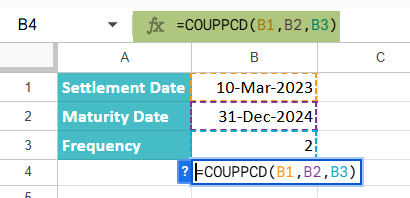
This function calculates the last coupon date before March 10, 2023, for a bond that pays interest twice a year and matures on December 31, 2024.
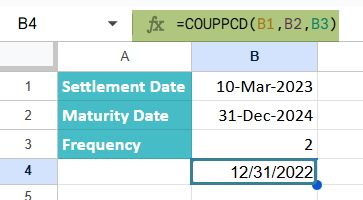
Step 4: Press Enter. You get the previous coupon date, which in this case would be December 31, 2022.
Entering COUPPCD Through the Menu Bar
You can also use Google Sheets’ built-in function menu to insert COUPPCD.
- Click on any blank cell where you want to insert the result.
- Navigate to the top menu bar and click Insert → Function → Financial.
- Scroll down and select COUPPCD from the list of financial functions.
- Enter the arguments and press Enter to calculate the result.
Examples
Here are some real-world examples that illustrate how to use COUPPCD in bond analysis.
Example #1 – Find the Previous Coupon Date of a Bond
An investor has purchased a bond on January 10, 2022. The bond matures on December 31, 2025, and it pays interest quarterly. The investor is to calculate the last interest payment that occurred before they bought the bond. This information is needed to find how long it has been since the bond started accruing interest.
Let us use the COUPPCD function for this.
Step 1: Open a new Sheet and enter the details as shown below.
- Settlement Date: January 10, 2022
- Maturity Date: December 31, 2025
- Frequency: 4 (quarterly)

Step 2: Go to cell B4 to get the result. Type the COUPPCD function using the cell references and the DATE function.
=COUPPCD(DATE(B1), DATE(B2), B3)
Alternatively, we can also write the values directly using the DATE function.
=COUPPCD(DATE(2022,1,10), DATE(2025,12,31), 2)

Step 4: Press Enter. The formula will return the previous coupon date before January 10, 2022.
This result tells the investor that the bond’s last interest payment was made on December 31, 2021, and interest has been accruing from that point up to their purchase on January 10, 2022.

Example #1
A person makes a bond investment made on June 15, 2023. It will mature on December 31, 2024, and pays interest every 6 months. Now, we need to know the last coupon payment date that occurred before June 15, 2023. Let us calculate how many days of interest have accrued since that last payment.
Let us use the COUPPCD in Google Sheets to find the same.
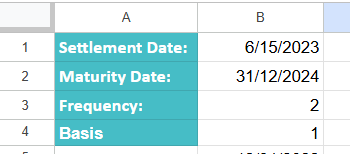
Step 1: Open a new Google Sheet and entering the relevant bond details. The dates should be properly formatted.
- Settlement Date: 6/15/2023
- Maturity Date: 31/12/2024
- Frequency: 2
- Basis: 1
Step 2: Go to cell B5 and enter the COUPPCD formula into the selected cell. You can use cell references if you have already input the data into the sheet, or write the values directly with the DATE function. Here are both options:
=COUPPCD(B1, B2, B3, B4)
The alternate function which we will use now:
=COUPPCD(DATE(2023,6,15), DATE(2024,12,31), 2,1)
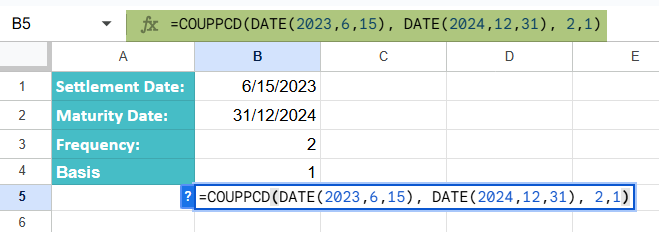
The function returns the previous interest payment date before the settlement date of June 15, 2023.
Press Enter.

Knowing this date helps you determine how many days of interest have accumulated up to June 15, 2023. This can be used to calculate the accrued interest, especially if the bond is being traded in the secondary market.
Example #3 – Determine the Previous Interest Payment Date for a Loan
A financial analyst is looking into a long-term loan and wishes to find the last interest payment date that occurred before a known transaction date. The loan was disbursed on April 1, 2022, and will mature on April 1, 2026. It is a quarterly payment loan.
The loan borrower made a transaction on July 20, 2023. Now the analyst wishes to determine when the previous interest payment would have been due before that date. For this, he uses the COUPPCD function in Google Sheets, which is ideal for identifying the last interest date before a specific settlement date.
Step 1: Let us enter the details in a new sheet.

Step 2: Let us enter the following formula in a sheet.
=COUPPCD(B1, B2, B3)
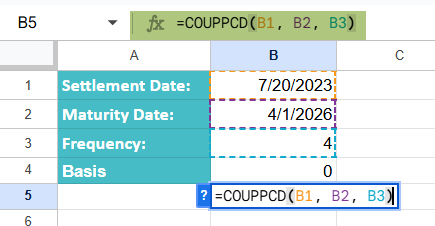
We get the result that the last scheduled interest payment is on July 1, 2023, based on a quarterly schedule.
Step 3: Press Enter. You get a result of July 1, 2023, which means the last interest payment date was just 19 days before the borrower’s transaction.

Thus, the analyst is able to check if the loan is following its agreed payment structure and can assess the period for which interest has accrued since the last payment.
Important Things to Note
- We must check if the settlement date is earlier than the maturity date to avoid the #NUM! error.
- Always format the date using the DATE function (DATE(year, month, day)( to avoid the #VALUE error.
- The last interest payment date calculated using COUPPCD helps find out how much interest has accumulated up to the settlement date.
Frequently Asked Questions (FAQs)
The COUPPCD and COUPNCD functions are used in Google Sheets for bond and loan calculations. But they come with some minor differences. While COUPPCD returns the previous coupon date before the settlement date, COUPNCD in Google Sheets returns the next coupon date after the settlement date.
Both functions have the same arguments – settlement date, maturity date, frequency, and an optional basis. However, the difference lies in whether we look forward or backward in the payment schedule.
COUPPCD helps calculate the accrued interest since the last payment.
COUPNCD helps find when the next interest payment is due.
Let us look at some of the errors:
• #NUM! Error: This error occurs when the settlement date is after the maturity date. To avoid this error, we should enter the dates are entered accurately.
• #VALUE! Error: This error occurs if invalid data types are entered in the settlement or maturity date fields.
• The frequency should be only 1,2, or 4 to avoid errors.
COUPPCD is used in determining how much interest has accrued since the last payment.
Another use is backtracking historical cash flows.
It is used for auditing bond or loan schedules.
It is used to support financial planning and reconciliation.
Use this COUPPCD in Google Sheets Template to follow along with the examples in this article.
Download Excel TemplateRecommended Articles
Continue with these related resources when you want the next practical step in this topic.
- PV in Google Sheets
- FV in Google Sheets
- NPV in Google Sheets
- IRR Google Sheets Function
- PMT in Google Sheets
Explore the full Google Sheets Financial Functions guide or browse Google Sheets Resources.