


Introduction to AI‑Powered Excel Analyst
Excel has always been a core tool in business roles. From finance teams to marketing departments, spreadsheets are used daily for tracking, reporting, and analysis. But in 2026, Excel is no longer just about formulas and manual work. AI tools have changed the way people use spreadsheets. With tools like Microsoft Copilot and ChatGPT, Excel tasks that used to take hours can now be done in minutes. Data cleaning, report generation, and even trend analysis can be partially automated. This is where the role of an AI-powered Excel analyst comes in. It is not a completely new job, but an upgraded version of a traditional analyst. The difference is in how the work gets done. Instead of doing everything manually, AI is used to speed up processes and improve accuracy.
If you are looking to move into data analysis or upgrade your current role, this is one of the most practical career paths right now.
What Is an AI‑Powered Excel Analyst?
An AI-powered Excel analyst is someone who uses Excel along with AI tools to work with data more efficiently. The role still involves analyzing data, building reports, and finding insights, but the approach is different. Instead of writing every formula manually, the analyst can ask AI to generate it. Instead of cleaning messy datasets row by row, they can use prompts to standardize the data quickly. This saves time and reduces errors. The job focuses more on understanding the data and making decisions rather than spending time on repetitive steps. AI becomes a support system that handles routine work.
Core Skills You Need to Master to be an AI‑Powered Excel Analyst
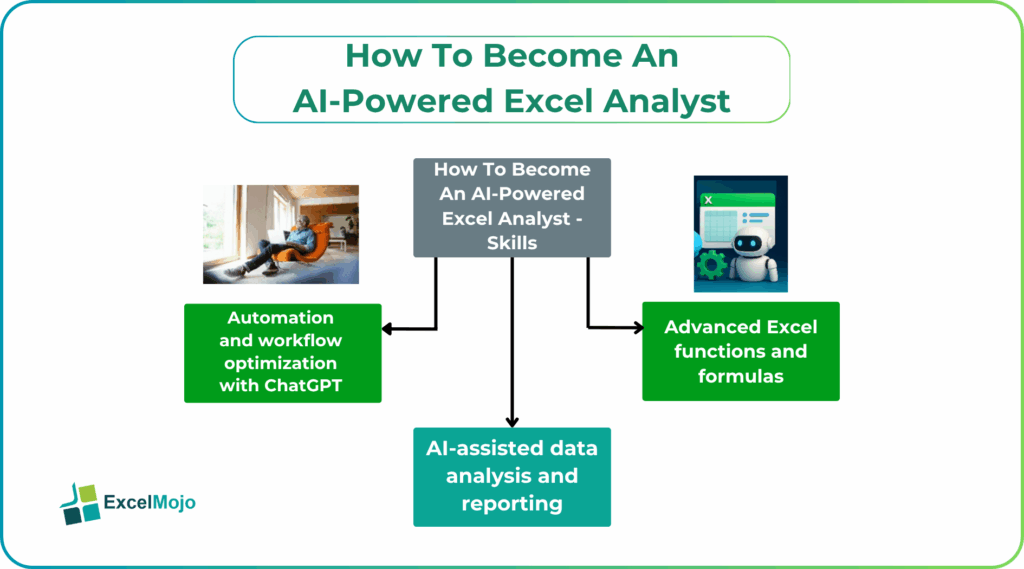
To become an AI-powered Excel analyst, you need a mix of traditional Excel knowledge and AI-based skills. One cannot replace the other. You still need to understand how data works, even if AI is helping you.
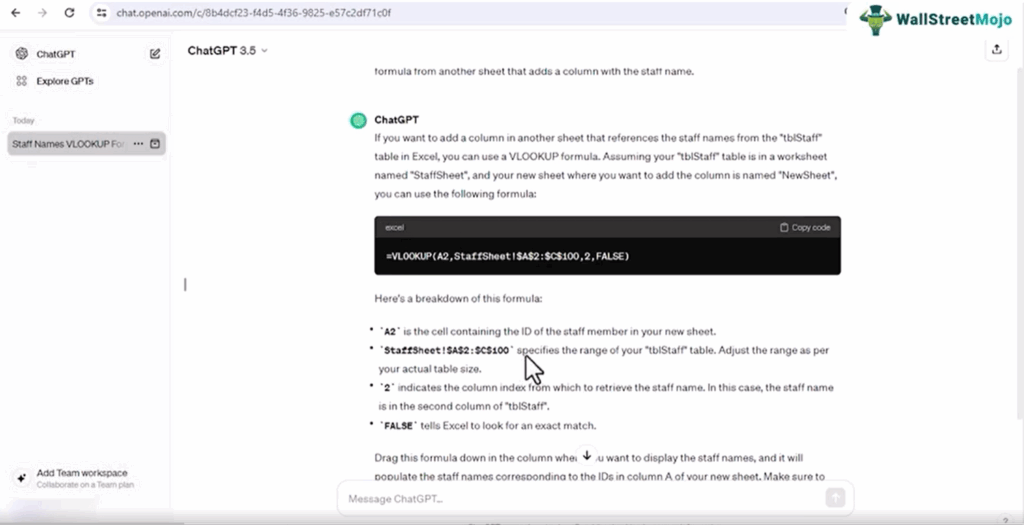
Video Screenshot: ChatGPT & AI For Microsoft Excel Course
#1 – Advanced Excel functions and formulas
Excel fundamentals are still very important. AI tools can generate formulas, but you need to understand them to use them correctly.
Key areas to focus on include:
- Lookup functions like VLOOKUP, XLOOKUP, and INDEX-MATCH
- Logical formulas such as IF and nested conditions
- Text functions for cleaning data
- Pivot tables for summarizing large datasets
Microsoft says these features are the foundation of data analysis. Even with AI support, knowing how they work helps you verify outputs and avoid mistakes.
#2 – AI‑assisted data analysis and reporting
This is where your AI Excel skills start to stand out. AI tools can quickly analyze datasets and give insights that would take much longer manually.
For example, you can ask AI to summarize a dataset, Identify trends in sales or performance data and generate charts or reports automatically. Tools like Copilot allow you to use natural language instead of complex steps. You can type what you want, and the tool interprets it.
This makes analysis faster and more accessible, especially when working with large or messy datasets.
#3 – Automation and workflow optimization with ChatGPT
This is where your skills start to stand out. AI tools can quickly analyze datasets and give insights that would take much longer manually. They can help you ask AI to summarize a dataset or identify trends in sales or performance data. One can also generate charts or reports automatically. Tools like Copilot allow you to use natural language instead of complex steps. You can type what you want, and the tool interprets it.

Video Screenshot: ChatGPT & AI For Microsoft Excel Course
This makes analysis faster and more accessible, especially when working with large or messy datasets.
How AI‑Excel Skills Boost Your Resume
AI‑Powered Excel Analyst – Automation is one of the biggest advantages of using AI in Excel. Many repetitive tasks can be simplified using prompts. One can use ChatGPT to clean and standardize CSV data and also generate Excel formulas. One can create templates for reports and suggest data validation rules. Instead of repeating the same steps every time, you can reuse AI-generated solutions. This improves efficiency and reduces manual effort. Automation skills are especially useful in jobs where you handle large datasets regularly.
Typical Career Pathways and Roles
An AI-powered Excel analyst can work in different roles depending on the industry. The skills are flexible and apply across many domains.
Some common Excel AI career paths include:
• Data Analyst
• Business Analyst
• Financial Analyst
• Operations Analyst
• Marketing Analyst
You may start with basic Excel work and gradually move into more advanced analysis roles. As you gain experience with AI tools, you can handle more complex tasks.
Tools and Courses to Get Started Fast
You do not need too many tools to get started. Most of what you need is already available. The key tools include Excel, Copilot, and ChatGPT. These are enough to begin learning AI-assisted workflows. The important part is learning how to use them together. Knowing Excel alone is not enough. You need to understand how AI can improve your workflow to be a successful AI‑Powered Excel Analyst. If you want a structured way to learn, taking a focused course can help. For example, the ChatGPT & AI For Microsoft Excel Course covers how to use AI tools inside Excel for real tasks like data cleaning, automation, and reporting. This kind of course helps you move faster because it focuses on practical use instead of theory. It shows how the tools are used in real work scenarios.
Frequently Asked Questions (FAQs)
An AI-powered Excel analyst works with data using Excel and AI tools together. They analyze datasets, create reports, and automate repetitive tasks. Instead of doing everything manually, they use AI to generate formulas, clean data, and find insights faster. This allows them to focus more on decision-making.
Programming is not required. Most AI tools like ChatGPT Excel analyst and Copilot work using simple natural language prompts. However, having basic Excel knowledge and logical thinking helps you use these tools effectively and understand the outputs.
An AI-Excel course gives you structured learning and practical examples. It teaches how to use AI tools for real tasks like automation and reporting. This helps you build confidence and apply the skills directly in a job. It also saves time compared to learning everything on your own.
Recommended Articles
Continue with these related resources when you want the next practical step in this topic.
- How To Use AI With Excel
- How AI Is Transforming Data Analysis In Excel (2026 Complete Guide)
- Excel AI And Machine Learning: Beginner’s Guide For 2026
- The Most Useful AI Features in Excel: Unlock Smarter Spreadsheets in 2026
- Top Skills for AI-Enabled Excel in 2026 (Must-Master List)
Explore the full Excel AI Automation and Analysis guide or browse Excel Resources.