


Introduction
Excel is still one of the most widely used tools for managing data. Almost every role involves repetitive tasks like cleaning data, updating reports, or building formulas. These tasks are important, but they take time and often slow down work. In 2026, AI tools are changing how these tasks are handled. Instead of doing everything manually, users can automate large parts of their workflow. AI can generate formulas, clean datasets, and even update reports automatically.

This shift is making Excel more powerful. It is no longer just a spreadsheet tool. It is becoming a system where workflows can be automated with minimal effort. People who understand how to use AI with Excel can complete tasks faster and focus more on analysis rather than manual work.
Why Excel Automation Is a Must‑Have Skill
Automation in Excel is not just about saving time. It also improves accuracy and consistency. When tasks are repeated manually, there is always a chance of error. Even a small mistake in a formula or dataset can affect the final output. AI helps reduce this risk by standardizing processes. Once a task is automated, it can be repeated without variation. This is especially useful in reporting, where the same steps are performed regularly.
Another reason automation is important is the volume of data. Modern datasets are larger and more complex. Manual methods are not efficient for handling thousands of rows or multiple data sources.
Companies are also moving toward faster decision-making. They expect reports to be updated quickly and accurately. Automation helps meet these expectations.
Because of these reasons, Excel workflow automation is now seen as a core skill rather than an advanced feature.
Key Areas to Automate with AI
AI can be applied to many parts of an Excel workflow. Instead of focusing on one task, it can improve the entire process from data input to reporting. Let us look at some key areas that can be automated.
#1 – Formula Generation and Optimization
Creating formulas is one of the most common tasks in Excel. However, writing complex formulas manually can be time-consuming and sometimes confusing. AI tools can generate formulas based on simple instructions. For example, instead of building a nested formula step by step, you can describe what you want and let the AI create it.
AI can also optimize existing formulas. It can suggest simpler versions or identify errors. This helps improve both speed and accuracy. Understanding formulas is still important, but AI reduces the effort required to create them.
#2 – Data Cleaning and Transformation
Data cleansing is often the most repetitive part of working with spreadsheets. Files may contain missing values, inconsistent formats, or duplicate records.
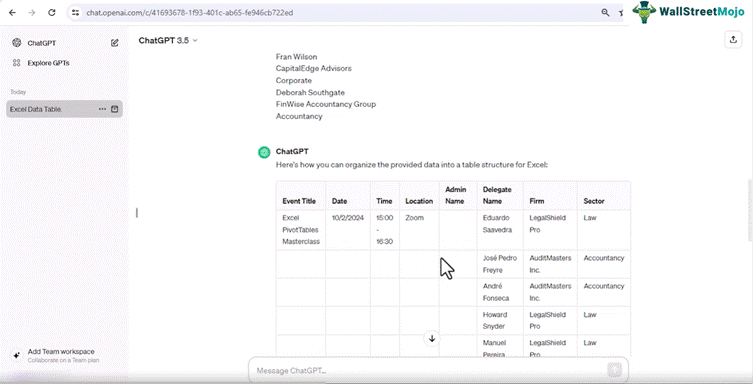
Video Screenshot: ChatGPT & AI For Microsoft Excel Course
AI can handle these issues more efficiently. It can standardize text, fix formatting problems, and remove duplicates based on patterns.
For example, messy CSV files can be cleaned using AI prompts. Instead of manually editing each column, you can apply consistent rules across the dataset. This makes the data ready for analysis much faster.
#3 – Reporting and Dashboard Updates
Reports and dashboards need regular updates. In many roles, the same report is refreshed daily, weekly, or monthly. AI can automate these updates by applying predefined logic. It can update calculations, refresh charts, and ensure that the latest data is reflected. This reduces the need to rebuild reports from scratch each time. It also ensures that reports remain consistent.
Automation in reporting allows users to focus more on interpreting results rather than preparing them.
How ChatGPT Fits into Excel Automation
ChatGPT plays a key role in AI-driven Excel automation because it works through natural language. You do not need to remember every formula or feature. ChatGPT Excel automation can be done by simply describing what you want to do. For example, you can ask ChatGPT to:
- Generate formulas for a specific task
- Clean and format data
- Suggest automation steps
- Explain how to fix errors
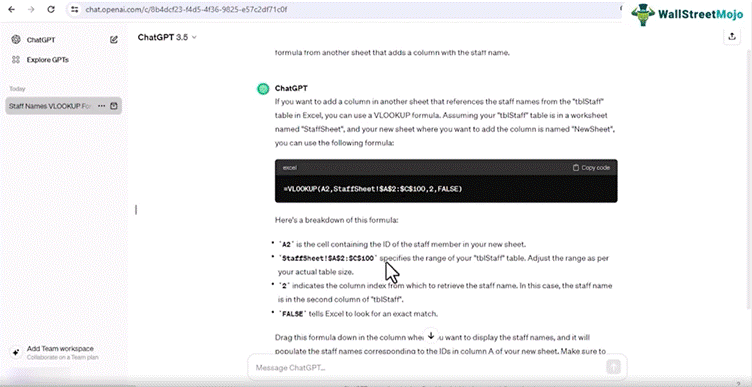
Video Screenshot: ChatGPT & AI For Microsoft Excel Course
This makes AI-enhanced Excel more accessible, especially for users who are not advanced in formulas. It also speeds up work because solutions can be generated instantly. ChatGPT acts like a guide that helps you perform tasks step by step. Over time, this improves your understanding of Excel as well. When combined with Excel tools like Copilot, it creates a more powerful workflow where most repetitive tasks can be automated.
Career Impact of AI Automation Skills
AI-driven automation skills are becoming important in many job roles. Employers are looking for candidates who can handle data efficiently and reduce manual work. When you know how to automate Excel tasks workflows, you can complete tasks faster and handle larger datasets. This makes you more productive and valuable in a team.
These skills are useful in roles such as:
- Data Analyst
- Business Analyst
- Finance Executive
- Operations Analyst
- Marketing Analyst
Automation also helps in career growth. Instead of spending time on routine tasks, you can focus on analysis and decision-making. This leads to more responsibility and better opportunities.
Many job descriptions now include automation and AI skills as requirements. Learning these skills early gives you an advantage.
Next Steps: Training and Certification
Getting started with AI-driven Excel automation does not require advanced technical knowledge. You can begin with basic Excel skills and gradually add AI tools to your workflow. The key is consistent practice. Start with small tasks like generating formulas or cleaning data using AI. Once you are comfortable, move on to automating larger workflows. If you prefer a structured approach, a focused course can help. For example, the ChatGPT & AI For Microsoft Excel Course covers how to use ChatGPT and AI tools directly within Excel tasks. It focuses on practical workflows like automation, reporting, and data transformation. This makes it easier to apply what you learn in real work situations.
Frequently Asked Questions (FAQs)
Many repetitive tasks can be automated, including formula creation, data cleaning, report generation, and duplicate removal. AI can also help with formatting, data validation, and summarizing datasets. While some tasks still need human review, most routine steps can be handled automatically.
The time saved depends on the type of work, but many users report saving several hours each week. Tasks that used to take hours, such as cleaning data or building reports, can often be completed in minutes. Over time, this leads to significant productivity gains.
A good course should focus on practical tasks rather than theory. It should show how to use AI tools for real workflows like data cleaning, automation, and reporting. Courses that combine Excel with ChatGPT provide a more complete learning experience for modern roles.
Recommended Articles
Continue with these related resources when you want the next practical step in this topic.
- How To Use AI With Excel
- How AI Is Transforming Data Analysis In Excel (2026 Complete Guide)
- Excel AI And Machine Learning: Beginner’s Guide For 2026
- The Most Useful AI Features in Excel: Unlock Smarter Spreadsheets in 2026
- Top Skills for AI-Enabled Excel in 2026 (Must-Master List)
Explore the full Excel AI Automation and Analysis guide or browse Excel Resources.