


Excel Copilot vs. ChatGPT
Excel Copilot vs ChatGPT are significant in their own ways. They empower Excel to do tasks which were previously done manually. So, which should you choose for your organization’s or individual needs? Microsoft Copilot is better for deep integration within the Microsoft 365 ecosystem. But, ChatGPT is more versatile for the different tasks within Excel. Copilot makes you more productive, helping 2with data analysis and formula generation, while ChatGPT offers superior coding abilities. IN this article, we discuss all about the utility of integrating either of them into Excel, their pros and cons, and how to use them.
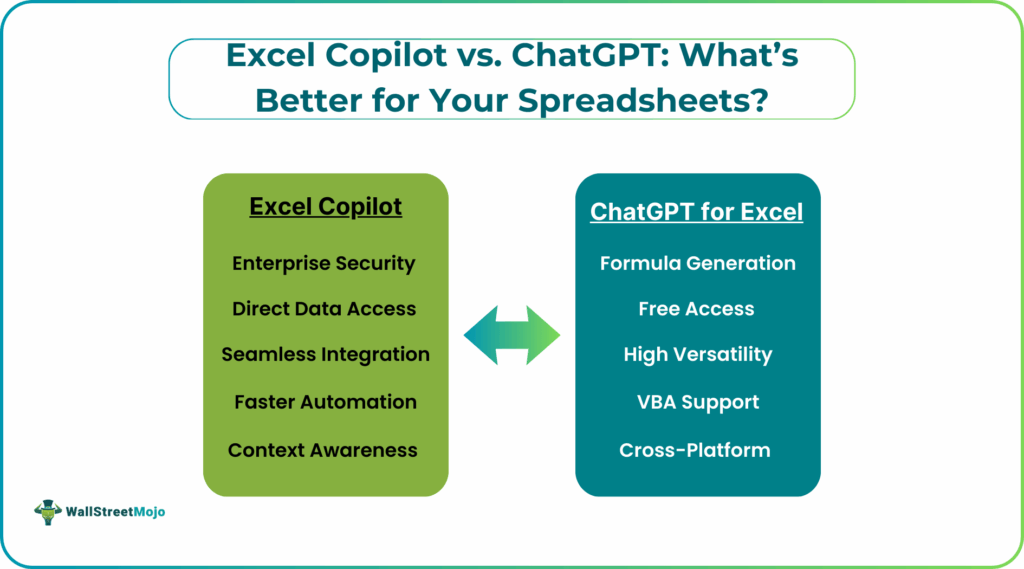
Introduction to Excel Copilot and ChatGPT
Microsoft Copilot is an AI assistant integrated directly into Microsoft 365 apps. It is available for all apps including Excel. It is used to boost productivity with in-app automation, data analysis, and task-specific functions.
ChatGPT is a versatile, conversational AI tool from OpenAI. When integrated into Excel, it can be used for a wide range of tasks like automation and data cleaning. Besides content creation, brainstorming, and general queries, it can be used with Excel via a web browser or specific add-ins.
Key Features Comparison
Before we do a deep-dive into their features and uses, let us compare them side by side, for better understanding of their differences
#1 – AI-Powered Formula Generation
- Copilot: It can generate formulas, suggest pivot tables, and create charts from natural language prompts directly within Excel, eliminating manual formula writing.
- ChatGPT: This is used to generate complex formulas, VBA scripts, and SQL queries which then must be manually copied and pasted into Excel.
#2 – Data Analysis and Insights
- Copilot: It analyzes data within the Microsoft 365 environment. It can summarize documents and provide relevant insights from your internal company data securely.
- ChatGPT: It can be used for generic data analysis by allowing users to upload files for summarization and analysis. It is more versatile than Copilot for data outside the Microsoft ecosystem.
#4 – Automation and Workflow Integration
- Copilot: It offers seamless integration within the Microsoft 365 suite, automating, drafting emails, and creating presentations from Word documents.
- ChatGPT: It integrates through a wide range of plugins, APIs, etc., providing broader automation options across various third-party applications.
#5 – User Interface and Ease of Use
- Copilot: The AI is embedded directly into existing Microsoft app interfaces. Hence, there is an intuitive experience for Microsoft users.
- ChatGPT: It operates as a standalone app with a conversational interface, requiring users to switch contexts or manually input data for processing.
Other key features include:
- Data & Security: Copilot uses your organization’s Microsoft cloud data. It has enterprise-grade security and compliance policies.
- ChatGPT usually works with public data. Else it should be integrated via an API to other tools. Security depends on the specific implementation and how you handle your data.
Performance and Accuracy in Excel Tasks
When it comes to performance, both Excel Copilot vs ChatGPT have good accuracy scores. They are highly accurate for common Excel tasks, though specific results can vary depending on the complexity of the formula.
In Excel Copilot vs ChatGPT, Copilot has a history of bugs. ChatGPT is considered more reliable overall.
Bases on the review of their features, you can choose between Excel Copilot and ChatGPT depending on your workflow. Copilot is better for integrated, real-time assistance within the Microsoft 365 ecosystem, while ChatGPT excels at flexible analysis, coding, and problem-solving as a standalone tool.
Pros and Cons of Excel Copilot
Let us look at the pros and cons of both Copilot vs ChatGPT Excel.
| Pros | Cons |
|---|---|
| Seamless Integration: It works directly inside Excel, leveraging your existing Microsoft 365 environment. | Requires M365 Subscription & Add-on: It is not a free tool. This Excel AI assistant comparison requires both an eligible Microsoft 365 plan and a separate paid Copilot license around $30/user/month. |
| Context-Aware: It understands the context of your entire Microsoft 365 data giving context-aware suggestions. | Limited Flexibility Outside Microsoft: However, it only works within the Microsoft ecosystem, making it unsuitable if you use other software. |
| Real-time Assistance: It generates formulas, summaries, and charts from natural language prompts instantly within the spreadsheet. | Performance & Accuracy Warnings: Microsoft advises reviewing outputs for critical financial accuracy as it may struggle with very large or complex datasets. |
Pros and Cons of ChatGPT for Excel
ChatGPT is a versatile, standalone AI assistant that interacts with data you manually copy/paste or upload.
| Pros | Cons |
|---|---|
| Versatility & Creativity: It excels at brainstorming, explaining complex logic like formulas or VBA code, and handling creative tasks. | Requires Manual Data Transfer: You must copy/paste data or upload files, which is time consuming. |
| Cross-Platform Flexibility: Accessible via web, mobile apps, and APIs, not tied to a specific software suite. | Data Privacy Risks: Using free or personal plans with sensitive corporate data poses security risks, as the data might be used to train models. |
| Powerful Data Analysis (with Plus/Enterprise): The Advanced Data Analysis (Code Interpreter) feature allows for in-depth analysis of uploaded files using Python code, generating charts and insights. | Data Volume Limitations: There are character and data volume limits when pasting or uploading, making large-scale analysis difficult. |
| Cost-Effective for Individuals: Offers powerful free access (to GPT-4o) and a more affordable individual paid plan (~$20/month) than the M365 Copilot add-on. | . |
Use Case Scenarios: When to Choose Excel Copilot vs ChatGPT
- Choose Excel Copilot when:
- You are a business professional using the Microsoft 365 ecosystem and need an AI that understands your existing files, emails, and meetings.
- You need to automate repetitive tasks within Excel on live company data with enterprise-grade security.
- You prioritize seamless integration over creative power or cross-platform flexibility.
- Choose ChatGPT when:
- You need help with learning, debugging complex formulas, or generating VBA/Python scripts from scratch.
- You need a general-purpose AI for various tasks like content creation, research, and data interpretation.
- You are a student who wants advanced features like code execution and data analysis at an affordable rate.
Cost and Accessibility Comparison
| Feature | Microsoft Copilot | ChatGPT |
|---|---|---|
| Availability in Excel | Built-in feature with specific license | Comes via file upload or third-party add-ons |
| Free Version? | A basic standalone chatbot with limited features | Yes, the main ChatGPT interface offers a robust free tier |
| Paid Cost | Copilot Pro: $20/month (for general use). The business paid cost is around ~$30/user/month | ChatGPT Plus: $20/month (for advanced models). Higher versions $25/user/month |
Final Verdict: Which One Is Better for Your Spreadsheet Needs?
The best AI for Excel would be a hybrid approach, using each of them in turns for their strength.
If your daily life revolves around Microsoft 365 with sensitive business data, Microsoft Copilot is the superior choice for its secure and seamless integration. You can automate analysis, generate summaries, and create visuals instantly within your existing workflow. If you need a versatile tool for a variety of tasks, including debugging complex formulas, writing automation scripts, or deep learning, ChatGPT is the more flexible and cost-effective option.
Frequently Asked Questions (FAQs)
Excel Copilot is built directly into Excel and automates formulas, analysis, and summaries inside the sheet. ChatGPT is a standalone AI that helps generate formulas, explanations, and analysis but requires manual copy-paste or add-ins.
ChatGPT can generate formulas, VBA, or cleanup logic that you apply in Excel while Copilot automates tasks inside the file. They can complement each other: ChatGPT for v=creative ideas and Copilot for execution within Excel.
Excel Copilot provides stronger automation since it directly manipulates data, formulas, tables, and charts. ChatGPT is better for logical reasoning, generating formulas, and scripting.
Recommended Articles
Continue with these related resources when you want the next practical step in this topic.
- Excel Copilot: What It Is and How to Get Started In 2026
- Top 10 AI Tools For Excel Data Analysis
- The Best Excel AI Plugins You Should Try This Year
- How to Integrate Gemini AI Directly in Excel Workbooks
- How To Get Job‑Ready with An AI‑Excel Certification (ChatGPT + Excel)
Explore the full Excel AI Tools and Copilot guide or browse Excel Resources.