


Introduction to Excel AI Plugins for Stock Market Analysis
Excel has long been the backbone of financial analysis. However, in today’s fast-moving stock markets, traditional spreadsheets alone are no longer enough. Excel AI plugins stock market enhance traditional spreadsheet analysis by integrating machine learning (ML) and natural language processing (NLP) to automate tedious tasks, uncover hidden patterns, and generate actionable insights from stock market data. Instead of manually collecting prices, calculating indicators, and building complex formulas, investors can now rely on AI-powered tools to perform these tasks instantly.
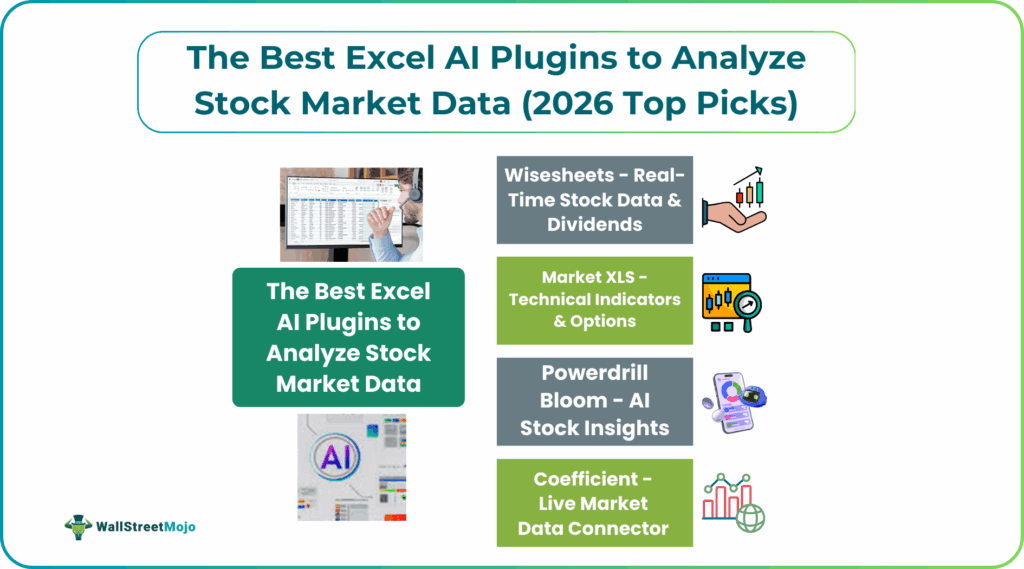
These plugins transform complex financial information into easy-to-understand dashboards, reports, and visualizations. They help analysts, and portfolio managers to focus on decision-making rather than data preparation. Whether you are tracking dividend stocks or analyzing technical indicators, Excel AI plugins stock market bridge the gap between raw market data and intelligent investment strategies. They are also used for forecasting earnings and building trading strategies.
Top 8 Excel AI Plugins for Stock Market Analysis
#1 – Wisesheets – Real-Time Stock Data & Dividends
Wisesheets is one of the most powerful Excel AI plugins stock market for investors who rely on accurate and up-to-date financial data. It provides instant access to historical financial statements. You can also get real-time stock prices and detailed dividend information, making it ideal for both fundamental investors and dividend-focused traders.
Using its unique Excel functions such as =WISE() and =WISEPRICE(), users can pull income statements, balance sheets, cash flow data, and much more directly into Excel. This allows investors to perform financial operations such as building custom stock screeners. It can also be used to perform ratio analysis, and populate complex valuation models without downloading data manually.
#2 – MarketXLS – Technical Indicators & Options
MarketXLS is an Excel add-in that brings live stock and options data straight into your spreadsheets and lets you use simple formulas to run analysis and build trading models.
It includes 120+ technical indicators, price history, and options analytics like Greeks, implied volatility, and open interest so traders can back test and monitor strategies without leaving Excel. With built-in screeners and charting tools, users can quickly spot patterns and develop sophisticated trading systems using familiar Excel functions.
#3 – Powerdrill Bloom – AI Stock Insights
Powerdrill Bloom is an AI data assistant that lets you upload your Excel, CSV, or PDF files. You can then automatically analyze them without manual setup or formulas. It detects trends, patterns, correlations, and key metrics. It can be used to create clear visualizations and summariesfor quick interpretation. This makes it a great tool for analysts who want fast insights from financial data without working tediously with raw numbers.
#4 – Excelmatic – Financial Modeling AI
Excelmatic is an AI-powered tool that helps you analyze and model financial data without writing complex formulas. You can interact with sheets using plain language and this helps easily automate workflows. It automates tasks like variance analysis, forecasting, scenario modeling, and anomaly detection. By reducing manual data entry and formula creation, Excelmatic makes it easier for users build valuation models, and make revenue forecasts, much faster and intuitively.
#5 – Coefficient – Live Market Data Connector
Coefficient connects Microsoft Excel directly to live financial data sources, allowing users to import real-time prices for stocks, market indexes, and currencies into their spreadsheets. By automatically refreshing data through secure API connections, it ensures that financial models, dashboards, and trading sheets always reflect the most current market conditions. This real-time integration helps analysts and traders make more accurate, data-driven decisions without relying on manual updates.
#6 – Datarails FP&A Stock Analyzer
Datarails is an Excel-native financial planning and analysis tool. It automates data consolidation, reporting, and forecasting. This reduces manual work required to gather and clean financial data from multiple spreadsheets. It lets finance teams build budgets, forecasts, and performance reports in real time with your existing Excel workflows working uninterrupted. This makes it easier to spot trends, analyze stock or financial performance, and not waste time on repetitive tasks.
#7 – SheetAI Stock Formula Generator
SheetAI uses AI to generate complex formulas for stock analysis. It simplifies the creation of custom functions for data retrieval, calculations, and modeling. Thus, advanced analysis is more accessible to users. It is basically a Google Sheets extension that uses AI to convert natural language prompts into complex formulas, saving time and simplifying data manipulation for users.
#8 – GPT for Excel Trading Assistant
GPT for Excel brings large language models directly into Excel. It enables data analysis and strategy development with plain language. Users can ask questions like “Which stocks have the highest growth this quarter?” and the AI responds with insights, formulas, or scripts. It can also help automate trading and report generation, making it a powerful interactive assistant for analysts.
Feature Comparison: Stock Data Plugins
Excel AI Plugins for Stock Market – Wisesheets excels at real-time financials and dividends, MarketXLS dominates technical and options analysis, Powerdrill Bloom delivers AI-driven insights, Excelmatic handles financial modeling, Coefficient provides live data connectivity, Datarails supports FP&A, SheetAI simplifies formula creation, and GPT for Excel enables conversational trading workflows.
Best stock data Excel plugins – The top Excel stock market add-ins 2026
| Plugin | Main Purpose | Key Strength |
|---|---|---|
| Wisesheets | Real-time stock data & dividends | Financials, ratios, dividend history |
| MarketXLS | Technical & options analysis | 120+ indicators, options Greeks |
| Powerdrill Bloom | AI-driven stock insights | Natural-language queries & smart visuals |
| Excelmatic | Financial modeling & forecasting | AI-powered projections & scenario analysis |
| Coefficient | Live market data connector | Auto-refreshing stock, index & FX data |
Together, these tools cover everything from raw market data to advanced predictive modeling, turning Excel into a complete stock research and trading platform.
Conclusion
The Excel AI Plugins for Stock Market transform spreadsheets into powerful stock analysis Excel AI platforms. They bring real-time prices, financials, technical indicators, and AI insights into one place. This allows investors and analysts to make faster, data-driven decisions. Using these Excel AI Plugins for Stock Market together gives Excel the power of a full trading and research terminal.
Frequently Asked Questions (FAQs)
Let us look at some of the best plugins for stock analysis.
First, we have Wisesheets, a tool that is ideal for pulling financials, dividends, and stock metrics directly into Excel. Besies, tools like MarketXLS, Powerdrill Bloom, Excelmatic, and Coefficient add technical indicators, AI insights, modeling, and live market feeds. Together, they cover everything from raw data to advanced stock analysis Excel AI.
Most plugins connect to stock exchanges and financial data providers through APIs. They stream live prices, volume, and fundamentals directly into Excel cells. The data refreshes automatically without manual updates.
AI plugins automatically calculate indicators like RSI, MACD, and moving averages. They analyze patterns and trends from historical and live data. This allows traders to generate signals and insights instantly inside Excel.
Recommended Articles
Continue with these related resources when you want the next practical step in this topic.
- Excel Copilot: What It Is and How to Get Started In 2026
- Top 10 AI Tools For Excel Data Analysis
- The Best Excel AI Plugins You Should Try This Year
- Excel Copilot vs. ChatGPT: What’s Better for Your Spreadsheets?
- How to Integrate Gemini AI Directly in Excel Workbooks
Explore the full Excel AI Tools and Copilot guide or browse Excel Resources.